Company News
Salesforce Call Center Integration
Client context
A communications-technology provider needed to make its call-center product more useful to Salesforce users. Its customers needed agents to handle live conversations without losing the account, contact, case, and opportunity context already held in their CRM.
Business challenge
Agents were switching between separate calling and CRM tools during every interaction. That fragmented workflow made call handling slower, reduced visibility into the customer record, and made consistent logging and follow-up harder to enforce.
What SoloSoft delivered
SoloSoft created a Salesforce call-center integration that connected the CRM workspace with the customer’s telephony environment. The product put call actions and real-time call status next to the Salesforce records agents already used.
- Connected the Salesforce interface to the call-control environment.
- Supported agent sign-in, call status, and connection management.
- Enabled click-to-dial, transfer, hold, retrieve, and conference actions from the CRM workflow.
- Surfaced the relevant customer record for inbound calls and created an integrated path for call notes and activity logging.

Agent workflow
The integration established a secure connection when the agent entered Salesforce, then kept telephony and customer context synchronized throughout the conversation.
The agent signs into the phone environment and launches the integration, which displays connection status in the system tray

The agent enters Salesforce, where the integration establishes the call-center connection using the agent’s credentials.
The Salesforce workspace receives live call events and displays the appropriate customer context.
-
From the Salesforce workspace, the agent can manage the call and keep the resulting customer activity connected to the appropriate CRM record.
The following illustration shows the integrated calling flow:
Dial phone number using Salesforce UI
v
Passing information to the plug-in
v
Call-control service establishes and monitors the call
v
Call status is synchronized with Salesforce
v
Established connection
v
Changed status in Salesforce UI
Product capabilities
-
Connection management
A lightweight desktop component managed the connection and configuration details while agents stayed in Salesforce for day-to-day call handling. -
Reliable session handling
The integration established the call-center session when Salesforce opened, supported reconnection when needed, and ended the session cleanly when the agent signed out. -
Agent authentication
Agents authenticated their call-center session from within the Salesforce experience, allowing customer context and call events to be associated with the right user. -
Calls Processing
-
Outgoing call
Agents could call directly from a Salesforce record. The integration initiated the call and reflected call status in the CRM interface, removing the need to manually re-enter phone numbers.
-
Incoming call
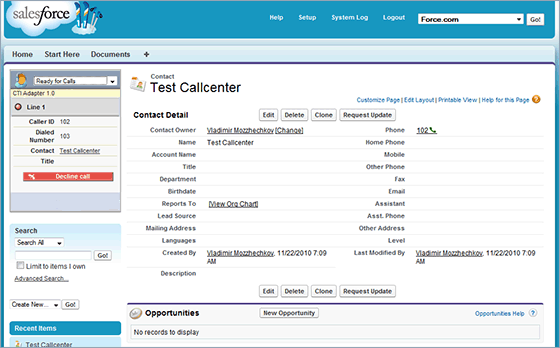
For inbound calls, the integration searched Salesforce for the caller and presented the matched contact or account record. Agents could begin the conversation with relevant history and account context already visible.

-
Call control from within the Salesforce.com web interface
Agents could hold, retrieve, transfer, and conference calls without leaving Salesforce, keeping both the conversation and associated work in one operating view.
-
Automatic call logging
Call notes and customer interactions could be logged against the relevant contact, account, case, or opportunity, giving teams a more complete record of follow-up activity.
-
Outgoing call
-
Administration controls
An administrative configuration utility allowed authorized users to manage connection settings and client configuration without interrupting agents’ workflows.
Business value
Reduced agent effort by bringing calling controls and CRM context into a single workflow.
Improved call handling consistency through live status visibility, structured call controls, and integrated activity logging.
Supported stronger customer service by presenting relevant Salesforce data as calls arrived and helping agents route interactions appropriately.