Virtual Infrastructure
- SSL Gateway
- Remote Access Portal for Windows
- Remote Access Portal for Linux
- Remote Access Portal for MAC
- Remote Access Portal for Java
- USB Redirection Device Driver
Customer
Quest Software is a large public company with 3,300 employees and $630 million in annual sales. They are a leading provider of server virtualization services, including Server Based Computing and Virtual Desktop Infrastructure. They offer superior services at a fraction of their competitors' price.
Business Needs
The customer must provide a variety of "last-mile" features over the full line of their product suite: server infrastructure, server management, security, client access, device drivers and more. They provide those services for a wide range of environments and operating systems, including Linux, Windows and Macintosh. SoloSoft was ideally placed to help them with the variety of top quality talent and experience available over the full range of their needs.
Our US-based project management helped them to react quickly to changing customer needs, allowing them to begin new projects, adjust ongoing projects to changing needs: and, of course, complete projects quickly and bring them to market.
The reduced cost of offshore European overhead, saving our customers up to 60%, allowed them to offer the quality features they required while managing costs to preserve their competitive price advantage.
Features of Remote Virtual Desktop Infrastructure (VDI) and Terminal Server Management Solution
The developed Remote Virtual Desktop Infrastructure (VDI) and Terminal Server Management Solution organizes RDP connections to virtual PCs which are a part of remote VDI hosted by the majority of existing virtualization solutions such as VMWare Workstation, VMWare ESX and ESXi servers, Microsoft Hyper-V and Microsoft Virtual PC.
The proposed solution provides secure access from Internet to VDI via traffic redirection tools and corresponding client libraries.
Features supported by the proposed solution:
Secure HTTP connections to VDI environment. Configuration files published on WEB, which are used for automatic connection configuration are accessed via secure protocol.
Automatic connection configuration based via downloading configuration files. User does not need to specify connection information manually. Instead, it can be downloaded and applied automatically.
Manual connection / access configuration. Besides auto-configuration user can specify connection information manually.
Simple user authentication. Simple login/password authentication can be handled by secure access gateway.
Certificate-based authentication. User can be authenticated by secure access gateway based on certificate installed on client PC.
Login-password OS based authentication. Login / password Windows based authentication is also supported by secure access gateway which allows usage of domain accounts when accessing remote DVI.
Automatic obtaining the list of published applications. The list of published application in remote VDI can be retrieved either via configuration files or directly from virtualization solutions such as Quest vWorkspace, also known as VAS server.
RDP-based connection. Client application and secure access gateway support connection to PCs in remote VDIs via RDP protocol and launching published applications.
RDP traffic encryption by SSL. All traffic between client application and secure access gateway, including RDP traffic, is encrypted with SSL.
Redirection of encrypted traffic. One secure gateway provides secure access to isolated VDIs from Internet.
HTTP / HTTPS wrapping of redirected traffic for firewall traversal. RDP traffic can optionally be wrapped to HTTP / HTTPS and as result is not blocked by high security level firewalls.
Support of Microsoft Internet Security and Acceleration server (MS ISA server). Client and secure gateway handle situations when MS ISA server is in the middle.
Proxy / firewall traversal. Client application supports firewalls and proxies for Internet connection.
Secure settings storage. All user sensitive data stored on local PCs is encrypted with strong encryption algorithms.
Client application working with minimal user permissions. The client application does not require administrative rights to be operable. In fact it can be run by user with absolute minimum of permissions.
Support for locked down PCs by client application. The client application does not require installation, does not install anything, does not modify Registry and does not leave any traces of its usage on PCs. This makes client application U3 standards compliant and operable on "Public PCs" where accounts with minimal rights are available to users, installing new software is prohibited and modifications of Registry are restricted.
Server Infrastructure
Server virtualization can be made much more efficient by booting many different virtual server instances from a single disk image (with proper licensing), rather than requiring a separately installed operating system for each instance. Using a single image for multiple instances of the Windows operating system presents considerable technical challenges:
-
Identification:
Different instances of the same boot image must present different identifying information; this information is typically hard-coded in the boot image. -
Authentication:
Access to resources is controlled by authenticating specific identifying information. This authentication information is typically hard-coded to match the hard-coded identification information, and must be synchronized to correctly control access. -
Licensing:
Multiple instances of the same boot image must be carefully controlled to ensure each instance is legally licensed. -
Version Compatibility:
Different versions of Windows have subtle differences in the boot process and other relevant components.
Our expertise with Windows system internals allowed us to create a system to quickly boot multiple instances of a single physical image, for several versions of Windows. And unlike the customer's competition, SoloSoft's solution maintains best security practices.

Security
Securing communications to mission-critical systems is a vitally important requirement for server virtualization. Our developers provided an extensible, configurable solution to authenticate users and encrypt traffic to and from virtual servers.
- Supports a variety of authentication mechanisms
- Can operate stand-alone or through a web browser
- Compatible with a variety of other security products requiring HTTP/HTTPS encapsulation.
Server Management
Using our experience with applications development and client-server systems development, we were able to substantially extend the customer's server management utility to allow systems administrators to quickly and efficiently manage groups of servers and groups of server clusters with common settings and features.


Client Access
To make use of Server Based Computing and Virtual Desktop Infrastructure, dozens, hundreds or even thousands of users actually use the provided servers and clusters. Our experience in a wide range of languages and environments allowed us to quickly provide software to make the portal efficient and natural in any environment. We extended the portal to a variety of platforms, including Macintosh, Linux, Windows, Java and any web browser. All this functionality was provided while maintaining the high standards of the original portal.
- Consistency of appearance and functionality across platforms
- Complicated remote application protocols across platforms
USB Redirection Device Driver
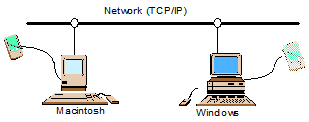
Server virtualization requires more than just sharing and balancing access to CPU, RAM and disk space. An important component missing from many virtualization solutions is shared access to the explosion of USB devices, not only printers but scanners, cameras, webcams, CD and DVD burners, and an ever-expanding list of new devices. Our systems engineers created a solution to share USB devices not just within a single operating-system family, but across multiple operating systems and environments. For example, one user can plug a USB scanner into her Macintosh and her neighbor can use it on his Windows machine as if it were plugged in locally.
- Requires getting in "underneath" the USB drivers on multiple platforms
- Deep understanding of USB protocols and data
- Efficient communications and fast response times